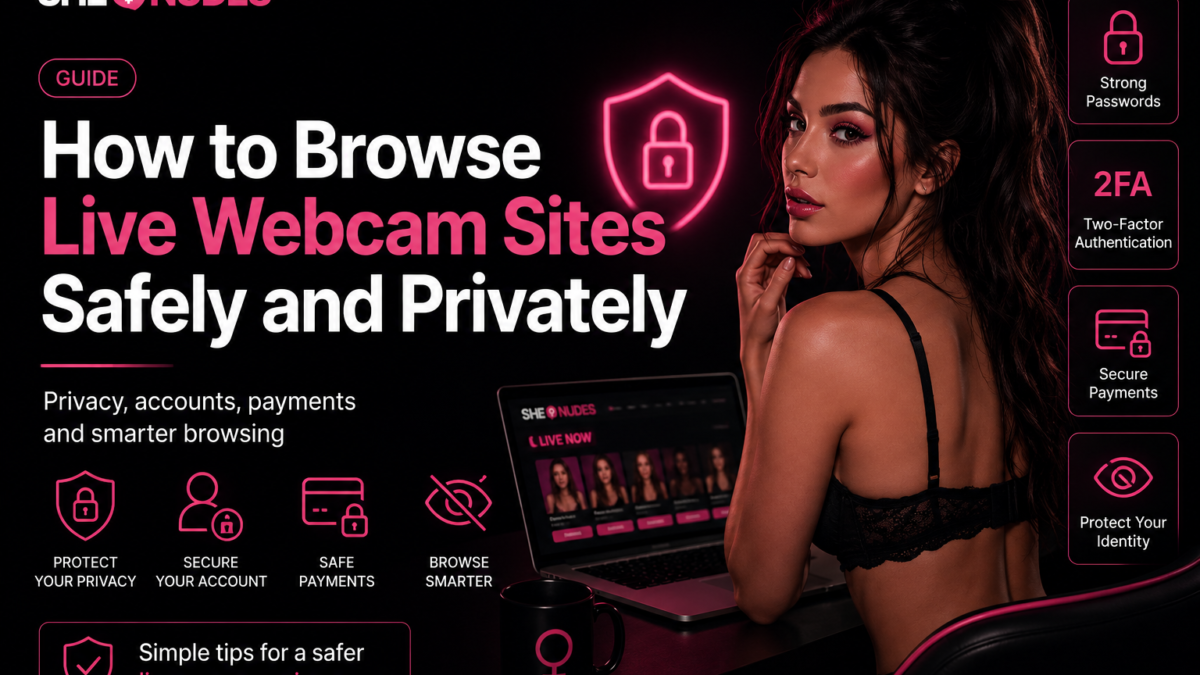
Live webcam platforms combine real-time video, public chat, user accounts, payment systems, and links to creator profiles. These features make live streaming interactive, but they also mean viewers should pay attention to privacy, account security, and the information they share.
Learning how to browse live webcam sites safely does not require advanced technical knowledge. A few practical habits can reduce unnecessary exposure, help protect payment details, and make it easier to recognize suspicious websites, messages, or downloads.
This guide covers safer browsing, passwords, privacy settings, public chat, payments, mobile devices, scams, and other important considerations for using live webcam platforms responsibly.
Choose Established and Transparent Platforms
The first step is deciding which websites you trust. Established platforms normally provide clear navigation, working legal pages, recognizable payment methods, and information about how accounts and subscriptions operate.
Before registering or entering payment details, look for:
- A valid HTTPS connection
- Clear terms and privacy information
- Visible support or contact options
- Transparent prices and billing rules
- Information about subscriptions and renewals
- A clear process for deleting or closing an account
- Consistent branding and navigation
A professional design does not guarantee that a site is trustworthy, but missing legal information, broken pages, aggressive popups, and unclear billing are reasons to be cautious.
Check That the Connection Uses HTTPS
Modern websites should use HTTPS to encrypt data sent between the browser and the server. Most browsers display a padlock or connection icon beside the address.
HTTPS helps protect information while it travels across the network, including login details and form submissions. It does not prove that every website is reputable, but entering passwords or payment information on an unencrypted page is a serious risk.
Before signing in or making a purchase:
- Check the complete domain name.
- Confirm that the address starts with
https://. - Watch for spelling changes or additional words in the domain.
- Avoid continuing if the browser displays a certificate warning.
Phishing pages often imitate legitimate platforms while using a slightly different domain.
Use a Unique Password
Reusing the same password across several websites is one of the most common account-security mistakes. If one service experiences a data breach, attackers may test the exposed login details on other platforms.
Create a unique password for every webcam provider or directory account.
A strong password should be:
- Long enough to resist simple guessing attacks
- Different from passwords used on email or banking accounts
- Difficult to predict from personal information
- Stored securely rather than reused from memory
A password manager can generate and store unique credentials. This is usually safer than using small variations of the same password.
Enable Two-Factor Authentication When Available
Two-factor authentication adds another step after the password. The platform may request a temporary code from an authentication application, email, or another approved method.
This can protect an account even when the password becomes known to someone else.
An authentication application is generally preferable to SMS when the platform supports it, but any additional verification is better than relying only on a password.
Protect the Email Account Connected to the Platform
Your email address is often used to reset passwords, confirm payments, and recover account access. Protecting the webcam account while leaving the connected email account unsecured is not enough.
Use a strong password and two-factor authentication on the email account as well.
Some viewers prefer to create a separate email address for entertainment platforms. This can help organize messages and prevent personal or professional inboxes from becoming connected to unrelated services.
A separate email address should still be protected with a unique password and recovery options.
Review Privacy Settings Before Using the Account
After registration, check the platform’s account and privacy settings before interacting publicly.
Look for controls related to:
- Public profile visibility
- Display name
- Email notifications
- Viewing history
- Favorites and follows
- Activity visibility
- Direct messages
- Marketing communications
Disable any optional visibility or communication feature you do not need.
Settings differ between platforms, so do not assume that a new account is private by default.
Choose a Display Name That Does Not Identify You
A public username should not reveal your real name, date of birth, employer, location, or usernames used on personal social networks.
Avoid combining details that could be used to identify you, such as:
- Your full name and year of birth
- Your town and profession
- A social media username
- A work email address
- A gaming handle strongly connected to your identity
Use a separate, neutral display name that is not linked to public profiles elsewhere.
Be Careful in Public Chat
Public chat messages may be visible to the model, moderators, and other viewers. Depending on the provider, they may also be stored for moderation or account-management purposes.
Do not share:
- Your full name
- Your home or work address
- Your telephone number
- Your personal email address
- Your employer or workplace
- Private social media profiles
- Financial information
- Passwords or verification codes
Even small details can become identifying when combined. A first name, profession, town, and public social media profile may be enough for someone to locate a real identity.
Keep Communication on the Official Platform
Be cautious when another user asks you to move immediately to an unknown messaging service, external website, or private payment method.
Official platform communication systems normally provide moderation, reporting tools, and account records. Moving elsewhere can remove those protections.
External communication is not automatically unsafe, but it should never require you to reveal personal information, download unknown software, or bypass the platform’s payment system.
Do Not Share Verification Codes
A legitimate support representative should not ask for a password or temporary authentication code in chat.
Verification codes are designed to confirm that you control an account. Sharing one can allow another person to complete a login, password reset, or payment action.
If you receive an unexpected code:
- Do not share it.
- Do not approve an unfamiliar login.
- Change your password.
- Review active sessions.
- Contact the platform through its official support page.
Understand Prices Before Paying
Live webcam platforms may use credits, tokens, subscriptions, tips, private sessions, or other payment models. The displayed price may not always use your local currency.
Before confirming a transaction, check:
- The real currency value
- The number of credits being purchased
- The price per minute when applicable
- Whether the charge is one-time or recurring
- Minimum purchase amounts
- Expiration rules for credits
- Refund conditions
Do not rely only on the appearance of a large credit balance. Convert the amount to its real monetary value before spending.
Check for Recurring Subscriptions
Some services offer memberships, fan clubs, premium plans, or recurring access. These may renew automatically until cancelled.
Before subscribing, confirm:
- The renewal frequency
- The recurring price
- The cancellation process
- Whether cancellation takes effect immediately or after the billing period
- Whether deleting the account also cancels the subscription
Save the confirmation email and review the account’s billing section after cancellation.
Use Official Payment Methods
Use payment options provided directly through the platform. Avoid sending money through unrelated applications, cryptocurrency addresses, gift cards, or direct transfers when the request comes from a stranger.
Payments made outside the official system may not provide:
- Purchase records
- Dispute options
- Fraud monitoring
- Platform support
- Refund procedures
A request to bypass normal payment methods is a common warning sign.
Review Billing Descriptions
Some platforms use a billing descriptor that differs from the public website name. This descriptor may appear on bank or card statements.
Before paying, check the platform’s billing information so you can recognize the charge later.
Unrecognized charges should be investigated promptly through the platform’s official support and, when necessary, the payment provider.
Set a Spending Limit
Interactive platforms can make spending feel less direct because viewers purchase credits before using them.
Establish a budget before entering paid rooms or purchasing tokens. Consider using:
- Account spending limits
- Purchase notifications
- A separate payment method with a controlled balance
- A fixed monthly entertainment budget
- Manual purchasing instead of automatic reloading
Disable automatic credit top-ups unless you deliberately want that feature.
Avoid Suspicious Downloads
Watching a live cam should not normally require downloading an unknown executable file, browser extension, codec, or “special player.”
Modern streaming platforms generally work directly inside a current web browser.
Be cautious if a page asks you to install:
- A video codec
- An unofficial browser extension
- A desktop viewing application from an unknown source
- A security certificate
- A remote access application
- A file sent through public chat
These downloads may contain adware, spyware, or other unwanted software.
Watch for Fake Play Buttons and Redirects
Some advertising pages imitate video controls. A large play icon may open another website rather than start the stream.
Warning signs include:
- Several overlapping play buttons
- Unexpected new tabs
- Repeated notification requests
- Fake virus warnings
- Pages claiming your player is outdated
- Redirects to unrelated offers
Close suspicious tabs without interacting with their alerts. Do not install software because a webpage claims the device is infected.
Be Careful With Browser Notifications
Websites may ask for permission to send browser notifications. These alerts can appear even when the website is closed.
Only allow notifications when you understand what will be sent and genuinely want updates from the platform.
If unwanted notifications begin appearing, remove the website’s permission through the browser’s privacy or site settings.
Use a Current Browser and Updated Device
Browser and operating-system updates frequently include security fixes. An outdated browser can expose the device to vulnerabilities already corrected in newer versions.
Keep updated:
- The operating system
- The web browser
- Security software
- Mobile applications
- Password-manager extensions
Remove extensions you no longer use, especially those with permission to read or modify every page you visit.
Consider a Separate Browser Profile
Browser profiles keep cookies, history, saved logins, and extensions separated. Creating a dedicated profile for entertainment browsing can help prevent accidental mixing with work or personal accounts.
A separate profile may contain:
- A dedicated email login
- Only the extensions you need
- Separate bookmarks
- Independent cookie storage
- No work or banking sessions
This is often more practical than constantly logging in and out of unrelated accounts.
Understand What Private Browsing Does
Private or incognito mode generally prevents the browser from storing local history, cookies, and form data after the private window closes.
It does not make activity invisible to:
- The website
- The internet provider
- The network administrator
- Workplace or school monitoring systems
- Malware already installed on the device
- Accounts you sign into
Private browsing is useful for reducing local traces on a shared device, but it is not complete anonymity.
Do Not Use Shared or Public Devices
A shared computer may store browser history, cached images, downloads, passwords, autofill information, or active sessions.
Avoid signing into sensitive accounts on:
- Public library computers
- Hotel business-center devices
- Shared workplace computers
- Devices belonging to people you do not trust
When using a shared household device, create a separate protected account and avoid saving passwords in a shared browser profile.
Be Careful on Public Wi-Fi
Public Wi-Fi networks can be convenient, but they may be shared by many unknown users. Avoid sensitive account or payment activity when the network cannot be trusted.
When using public Wi-Fi:
- Confirm the official network name.
- Avoid networks with suspiciously similar names.
- Use HTTPS websites only.
- Disable file sharing.
- Do not ignore certificate warnings.
- Use mobile data for payment activity when possible.
A trusted VPN can add protection between the device and the VPN service, but it does not make a suspicious website safe.
Protect Mobile Devices
Mobile phones contain personal messages, photographs, contacts, location information, and active account sessions. Use the same caution on mobile that you would use on a computer.
Recommended steps include:
- Use a screen lock.
- Keep the operating system updated.
- Review application permissions.
- Disable notification previews on the lock screen when appropriate.
- Avoid installing applications from unknown sources.
- Sign out before lending the device to someone else.
Browser tabs may remain active in the background, so close private sessions when you finish.
Review Camera and Microphone Permissions
Viewers normally do not need to give a webcam platform permission to access their own camera or microphone just to watch a public stream.
If the browser requests access unexpectedly, deny it unless you are intentionally using a feature that requires your camera or microphone.
You can review existing permissions in the browser settings and remove access from websites that no longer need it.
Manage Autoplay and Sound
Live video and reel pages may start playback automatically. Browsers often require autoplay content to begin muted, but sound can still activate after user interaction.
Use the platform’s mute controls and check the browser tab before opening a site in a public or shared environment.
Headphones can provide privacy, but keep the volume at a safe level and make sure the device is connected to the expected audio output.
Recognize Common Scams
Scams can appear through fake profiles, public chat, direct messages, advertising pages, or copied websites.
Common warning signs include:
- Requests for gift cards or cryptocurrency
- Promises of guaranteed personal meetings
- Urgent requests for emergency money
- Requests for passwords or authentication codes
- Unknown files or applications
- Links claiming to provide free unlimited credits
- Threats involving fabricated recordings or account information
- Requests to bypass official platform payments
Do not send money or personal documents in response to pressure, urgency, or emotional manipulation.
Do Not Trust “Free Credit” Generators
Websites claiming to generate free credits, tokens, premium accounts, or private access are generally fraudulent.
They may attempt to collect:
- Login credentials
- Payment information
- Survey revenue
- Downloads
- Browser-notification permissions
Credits should only be purchased or earned through the official methods described by the platform.
Use Reporting and Blocking Tools
Reliable platforms provide options to report harassment, impersonation, suspicious payment requests, spam, or policy violations.
When reporting an incident, include:
- The username involved
- The date and approximate time
- The room or page URL
- A brief factual description
- Screenshots when permitted and appropriate
Block accounts that continue sending unwanted messages. Do not continue engaging simply to gather more evidence.
Respect Models and Room Rules
Safety also includes respectful behavior toward the people broadcasting. Models are real individuals working through a platform, not anonymous content objects.
Viewers should:
- Follow room rules.
- Avoid harassment or threats.
- Do not demand personal information.
- Respect stated boundaries.
- Use official interaction features.
- Do not redistribute content without permission.
Respectful participation improves the experience for models, moderators, and other viewers.
Be Cautious With External Profiles and Links
Creators may have official profiles on other services, but copied accounts and impersonation can occur.
When following an external link:
- Check whether it appears on the model’s official platform profile.
- Review the exact domain.
- Do not enter platform credentials on another website.
- Avoid downloading files.
- Be cautious with accounts created recently or using copied images.
Never assume that a social profile is genuine based only on photographs or a matching username.
Review Active Sessions
Some platforms provide a list of devices or browser sessions connected to the account. Review this section occasionally.
Sign out unfamiliar sessions and change the password when you notice:
- An unknown location
- A device you do not recognize
- Unexpected account changes
- Messages you did not send
- Purchases you did not make
Use the option to sign out everywhere after a suspected account compromise.
Check Account and Payment History
Review recent transactions, subscriptions, credit purchases, and account activity. Detecting an unfamiliar action early makes it easier to contact support and the payment provider.
Do not wait for a monthly statement when the platform provides real-time billing information.
Know How to Delete the Account
Before registering, it is useful to understand how the account can be closed later.
Account deletion may not automatically cancel:
- Recurring subscriptions
- Pending payments
- External mailing lists
- Connected provider accounts
Cancel active subscriptions first, save confirmation messages, and then follow the account-deletion process.
Live Directories and Original Providers
A webcam directory may organize models from several original providers. The directory helps users discover rooms, but full interaction, registration, and payment may take place on the provider’s website.
Before continuing to another platform:
- Check the destination domain.
- Review the provider’s own terms and privacy policy.
- Do not assume account settings transfer between services.
- Confirm prices on the final payment page.
You can browse currently live models and compare rooms before deciding whether to open the original provider.
Safety When Browsing Recorded Videos and Reels
Many of the same precautions apply to recorded videos and short-form reels.
Remote videos and GIFs may occasionally expire or become unavailable. A broken media file should not require installing another player or downloading a codec.
When content fails:
- Refresh the page once.
- Move to another video or reel.
- Do not install a plugin suggested by an advertisement.
- Report repeated technical problems through official support.
Media errors are usually caused by an expired file, remote CDN issue, or deleted source rather than missing software on your device.
A Simple Safe-Browsing Checklist
Before using a live webcam platform, follow this quick checklist:
- Check the exact domain and HTTPS connection.
- Use a unique password.
- Enable two-factor authentication.
- Choose a non-identifying username.
- Review privacy and notification settings.
- Keep personal information out of public chat.
- Understand prices and renewals before paying.
- Use official payment and communication systems.
- Reject unexpected camera and microphone requests.
- Do not download unknown players, codecs, or extensions.
- Keep the browser and device updated.
- Review account sessions and billing activity regularly.
Frequently Asked Questions
Is private browsing enough to stay anonymous?
No. Private browsing mainly prevents local browser history and cookies from remaining after the session. Websites, account providers, network administrators, and internet providers may still see activity.
Do I need to allow camera access to watch live cams?
No. Watching a public stream should not normally require access to your camera or microphone. Deny unexpected permission requests.
Is it safe to use a credit card on webcam sites?
Use established platforms with HTTPS, clear billing information, recognizable payment processors, and transparent refund and subscription policies. Review the amount and billing descriptor before confirming.
Should I use my real name in public chat?
No. Use a separate display name that does not reveal your identity, location, workplace, or personal social media accounts.
Can a model or viewer see my home address?
Other users should not normally see billing or account details. However, information you share publicly may reveal your identity, so avoid posting personal details in chat or messages.
Are free-token generators legitimate?
No legitimate platform requires an external generator to create free credits. These websites commonly collect passwords, payment data, survey revenue, or unwanted downloads.
What should I do after noticing an unfamiliar payment?
Review the platform’s billing history, change the account password, contact official support, and notify the payment provider when necessary. Do not rely on contact details provided in a suspicious message.
Browse Live Webcam Sites With More Confidence
Safe browsing depends on a combination of technical security, privacy awareness, and careful decisions. Use unique passwords, protect the connected email account, avoid sharing identifying information, understand payment terms, and keep communication within official systems.
Most risks can be reduced by slowing down before clicking, downloading, paying, or responding to urgent requests.
Live cams, videos, galleries, and reels can all be explored more confidently when accounts, devices, and personal information are properly protected.
Browse smarter and protect your privacy
Explore current live rooms while keeping your account, payments, and personal information protected. Explore Live Cams